 3f82902ebe
* Add Elegoo filament profiles to OrcaFilamentLibrary Add 7 Elegoo filament profiles based on manufacturer specifications: - Elegoo Rapid PETG (high-speed PETG, 240-270°C, 30-600mm/s) - Elegoo PETG Pro (standard PETG, 230-260°C, 30-270mm/s) - Elegoo PETG-CF (carbon fiber PETG, 240-270°C, 30-220mm/s) - Elegoo PLA (standard PLA, 190-230°C, 30-280mm/s) - Elegoo Rapid PLA+ (high-speed PLA, 190-230°C, 30-600mm/s) - Elegoo ASA (ASA, 250-280°C, 30-270mm/s) - Elegoo TPU 95A (flexible TPU, 220-240°C, 30-60mm/s) All settings sourced from Elegoo's official product specifications. * Fix dual seam fuzzy painted rev 2 (#11923) * 2 seam fuzzy 2nd attempt * Update FuzzySkin.cpp * Fix debug SVG * solve bump artifact in extrusion junction joint * minor fixes * cleaning Update FuzzySkin.cpp * Fix filament override changes not appearing in Unsaved Changes and showing as “Undef category” in preset comparison (#12298) * Fix an issue that on Windows the Bambu legacy plugin is 01.10.01.09 (#12380) * tweak legacy library migration from rename to copy in BBLNetworkPlugin (#12400) * tweak legacy library migration from rename to copy in BBLNetworkPlugin * Add Pressure Advance visualization support (#11673) * Add Pressure Advance visualization support Signed-off-by: minicx <minicx@disroot.org> * Port Pressure Advance visualization to libvgcode architecture Adapt PA visualization (originally in commite3a77259) to work with the new libvgcode library introduced by upstream PR #10735. Changes across the libvgcode stack: - PathVertex: add pressure_advance field - Types.hpp: add PressureAdvance to EViewType enum - ViewerImpl: add ColorRange, color mapping, range updates for PA - LibVGCodeWrapper: pass pressure_advance from MoveVertex to PathVertex GCodeViewer UI integration: - Add "Pressure Advance" to view type dropdown - Add PA color range in legend (3 decimal places) - Add PA value display in sequential view marker tooltip - Add PA row in position properties table The GCodeProcessor PA parsing (M900, M572, SET_PRESSURE_ADVANCE) is preserved from the original implementation. * Tag Pressure Advance visualization changes with ORCA comments Signed-off-by: minicx <minicx@disroot.org> --------- Signed-off-by: minicx <minicx@disroot.org> Co-authored-by: Ioannis Giannakas <59056762+igiannakas@users.noreply.github.com> Co-authored-by: Claude <noreply@anthropic.com> * Fix time estimation using wrong machine limits due to broken extruder_id indexing (#12411) The extruder_id*2 offset in get_axis_max_feedrate/get_axis_max_acceleration was cherry-picked from BambuStudio's per-nozzle limit system, which OrcaSlicer never ported. Without that system the limit arrays only have 2 values ([0]=Normal, [1]=Stealth), so any extruder_id > 0 or the uninitialized value (255) would overshoot the array and fall back to values.back(), always returning stealth-mode limits and producing incorrect time estimates. Revert to indexing by time mode only (matching v2.3.1 behavior) and simplify the M201/M203 handlers to write only the two mode slots they actually use. * Fix machine envelope G-code emitting wrong limits due to broken extruder_id indexing (#12414) print_machine_envelope() used get_extruder_id(extruder_id)*2 to index machine limit arrays that only hold [Normal, Stealth] (2 entries). For multi-extruder setups this went out-of-bounds, causing wrong M201/M203 values in the G-code which then override the estimator's correct limits. Same class of bug asc6d1c11ebbbut on the G-code writer side. Changes: - Remove unused extruder_id param from print_machine_envelope() - Use .values.front() for M201/M203, matching M204/M205 in same function - Change get_option_value() fallback from .back() to .front() so any future out-of-bounds index returns Normal mode instead of Stealth * update error message when plugin upgrade failed * Add and update pt-BR translations (#12409) * Add preference for filament area height to reduce scrolling while using 16+ filaments (#12317) Fixes https://github.com/OrcaSlicer/OrcaSlicer/issues/12284 Adds a preference for filaments area height since every user has different amount of MM units and external filaments so users can set a value that fits their setups this way we might see 3 or 6 filaments for each unit on future. thats why i set value as int used 10 as default value. its good for 2 multimaterial units ( 8 filaments ) and 1 external filament min value is 8. might be good when no external filaments in use max value is 99. UI works same as 2.3.1 version <img width="562" height="122" alt="Screenshot-20260215194149" src="https://github.com/user-attachments/assets/309cec36-8b83-48f3-875f-d5f22a9631e7" /> **BEFORE** Scrollable area fixed for 10 items. that causes a lot of scrolling whe user has 3 or 4 ams units <img width="411" height="237" alt="Screenshot-20260215194816" src="https://github.com/user-attachments/assets/fc7823c0-d82a-4d1f-bb5b-56e8dd47abd2" /> **AFTER** value 10. - 2 multimaterial units ( 8 filaments ) and 1 external filament <img width="1002" height="250" alt="Screenshot-20260215195243" src="https://github.com/user-attachments/assets/e3238cd1-788e-4ed2-b048-89c63bd323db" /> value 18 - 4 multimaterial units ( 16 filaments ) and 1 external filament <img width="1001" height="355" alt="Screenshot-20260215195127" src="https://github.com/user-attachments/assets/afe0305e-fcb4-4a51-b8dc-e70a063aa391" /> * Fix: Correct range checking for int and float Config Options + QoL changes in tooltips (#11915) * Fix float number not working properly for option min/max (#11211) * ConfigOptionDef: min/max values type are changed from INT to FLOAT. (cherry picked from commit f277bc80c22e0c9a067481a4301922e2c96aed47) * Fix infinite loop and crash when `fuzzy_skin_point_distance` = 0 (SoftFever/OrcaSlicer#11069) * Fix Linux build issue * Fix float comparison due to precision loss * Fix: Range check added for coInt options; Ranges and defaults added in tooltips --------- Co-authored-by: Noisyfox <timemanager.rick@gmail.com> Co-authored-by: SoftFever <softfeverever@gmail.com> * Update machine profile for OpenEYE Peacock V2 (#12333) * OpenEYE Peacock V2 machine profile: Add printer_agent key to enable AMS filament synchronization (Klipper/Moonraker) Signed-off-by: Sezgin AÇIKGÖZ <sezginacikgoz@mail.com> * Optimize retraction settings in printer profiles to reduce stringing and improve print quality Signed-off-by: Sezgin AÇIKGÖZ <sezginacikgoz@mail.com> --------- Signed-off-by: Sezgin AÇIKGÖZ <sezginacikgoz@mail.com> * Fix preheat regression bugs (#12438) Fix preheat regression bugs revert769fc137c7* Fix the issue where `resources/profiles/OrcaFilamentLibrary.json` is not updated accordingly. --------- Signed-off-by: minicx <minicx@disroot.org> Signed-off-by: Sezgin AÇIKGÖZ <sezginacikgoz@mail.com> Co-authored-by: Rodrigo Faselli <162915171+RF47@users.noreply.github.com> Co-authored-by: Kiss Lorand <50251547+kisslorand@users.noreply.github.com> Co-authored-by: SoftFever <softfeverever@gmail.com> Co-authored-by: minicx <39405619+loss-and-quick@users.noreply.github.com> Co-authored-by: Ioannis Giannakas <59056762+igiannakas@users.noreply.github.com> Co-authored-by: Claude <noreply@anthropic.com> Co-authored-by: Alexandre Folle de Menezes <afmenez@terra.com.br> Co-authored-by: yw4z <ywsyildiz@gmail.com> Co-authored-by: Valerii Bokhan <80919135+valerii-bokhan@users.noreply.github.com> Co-authored-by: Noisyfox <timemanager.rick@gmail.com> Co-authored-by: Sezgin AÇIKGÖZ <sezginacikgoz@mail.com>


OrcaSlicer: an open source Next-Gen Slicing Software for Precision 3D Prints.
Optimize your prints with ultra-fast slicing, intelligent support generation, and seamless printer compatibility—engineered for perfection.
Official links and community
Official Website:
Github Repository:

Follow us:

Join our Discord community:

|
⚠️ CAUTION: Several clickbait and malicious websites, such as orca-slicer[.]com and orcaslicer[.]net, are pretending to be the official OrcaSlicer site. These sites may redirect you to dangerous downloads or contain misleading information. Our only official website is www.orcaslicer.com. If you come across any of these in search results, please report them as unsafe or phishing to help keep the community secure with: - Google Safe Browsing - Microsoft Security Intelligence - IPThreat |
Main features
- Advanced Calibration Tools
Comprehensive suite: temperature towers, flow rate, retraction & more for optimal performance. - Precise Wall and Seam Control
Adjust outer wall spacing and apply scarf seams to enhance print accuracy. - Sandwich Mode and Polyholes Support
Use varied infill patterns and accurate hole shapes for improved clarity. - Overhang and Support Optimization
Modify geometry for printable overhangs with precise support placement. - Granular Controls and Customization
Fine-tune print speed, layer height, pressure, and temperature with precision. - Network Printer Support
Seamless integration with Klipper, PrusaLink, and OctoPrint for remote control. - Mouse Ear Brims & Adaptive Bed Mesh
Automatic brims and adaptive mesh calibration ensure consistent adhesion. - User-Friendly Interface
Intuitive drag-and-drop design with pre-made profiles for popular printers. - Open-Source & Community Driven
Regular updates fueled by continuous community contributions. - Wide Printer Compatibility
Supports a broad range of printers: Bambu Lab, Prusa, Creality, Voron, and more. - Additional features can be found in the change notes.
Wiki
The wiki aims to provide a detailed explanation of the slicer settings, including how to maximize their use and how to calibrate and set up your printer.
Download
Stable Release
📥 Download the Latest Stable Release
Visit our GitHub Releases page for the latest stable version of OrcaSlicer, recommended for most users.
Nightly Builds
🌙 Download the Latest Nightly Build
Explore the latest developments in OrcaSlicer with our nightly builds. Feedback on these versions is highly appreciated.
How to install
Windows
Download the Windows Installer exe for your preferred version from the releases page.
-
For convenience there is also a portable build available.
Troubleshooting
- If you have troubles to run the build, you might need to install following runtimes:
- MicrosoftEdgeWebView2RuntimeInstallerX64
- vcredist2019_x64
- Alternative Download Link Hosted by Microsoft
- This file may already be available on your computer if you've installed visual studio. Check the following location:
%VCINSTALLDIR%Redist\MSVC\v142
Windows Package Manager
winget install --id=SoftFever.OrcaSlicer -e
Mac
-
Download the DMG for your computer:
arm64version for Apple Silicon andx86_64for Intel CPU. -
Drag OrcaSlicer.app to Application folder.
-
If you want to run a build from a PR, you also need to follow the instructions below:
Quarantine
-
Option 1 (You only need to do this once. After that the app can be opened normally.):
- Step 1: Hold cmd and right click the app, from the context menu choose Open.
- Step 2: A warning window will pop up, click Open
-
Option 2: Execute this command in terminal:
xattr -dr com.apple.quarantine /Applications/OrcaSlicer.app -
Option 3:
- Step 1: open the app, a warning window will pop up
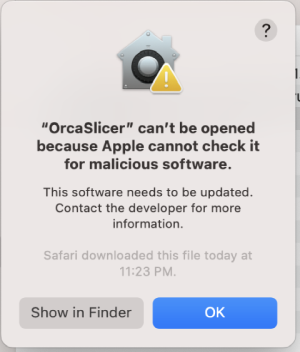
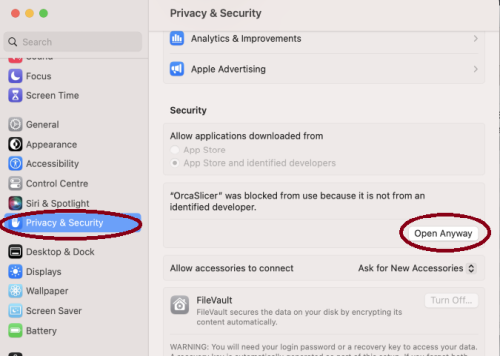
- Step 2: in
System Settings->Privacy & Security, clickOpen Anyway:
- Step 1: open the app, a warning window will pop up
-


Linux (Ubuntu)
- If you run into trouble executing it, try this command in the terminal:
chmod +x /path_to_appimage/OrcaSlicer_Linux.AppImage
How to Compile
All updated build instructions for Windows, macOS, and Linux are now available on the official OrcaSlicer Wiki - How to build page.
Please refer to the wiki to ensure you're following the latest and most accurate steps for your platform.
Klipper Note
If you're running Klipper, it's recommended to add the following configuration to your printer.cfg file.
# Enable object exclusion
[exclude_object]

# Enable arcs support
[gcode_arcs]
resolution: 0.1
Supports
OrcaSlicer is an open-source project and I'm deeply grateful to all my sponsors and backers.
Their generous support enables me to purchase filaments and other essential 3D printing materials for the project.
Thank you! :)
Sponsors:

|

|
Backers:
Ko-fi supporters ☕: Backers list
Support me



Some background
OrcaSlicer was originally forked from Bambu Studio, it was previously known as BambuStudio-SoftFever.
Bambu Studio is forked from PrusaSlicer by Prusa Research, which is from Slic3r by Alessandro Ranellucci and the RepRap community. OrcaSlicer incorporates a lot of features from SuperSlicer by @supermerill OrcaSlicer's logo is designed by community member Justin Levine (@freejstnalxndr).
License
- OrcaSlicer is licensed under the GNU Affero General Public License, version 3. OrcaSlicer is based on Bambu Studio by BambuLab.
- Bambu Studio is licensed under the GNU Affero General Public License, version 3. Bambu Studio is based on PrusaSlicer by PrusaResearch.
- PrusaSlicer is licensed under the GNU Affero General Public License, version 3. PrusaSlicer is owned by Prusa Research. PrusaSlicer is originally based on Slic3r by Alessandro Ranellucci.
- Slic3r is licensed under the GNU Affero General Public License, version 3. Slic3r was created by Alessandro Ranellucci with the help of many other contributors.
- The GNU Affero General Public License, version 3 ensures that if you use any part of this software in any way (even behind a web server), your software must be released under the same license.
- OrcaSlicer includes a pressure advance calibration pattern test adapted from Andrew Ellis' generator, which is licensed under GNU General Public License, version 3. Ellis' generator is itself adapted from a generator developed by Sineos for Marlin, which is licensed under GNU General Public License, version 3.
- The Bambu networking plugin is based on non-free libraries from BambuLab. It is optional to the OrcaSlicer and provides extended functionalities for Bambulab printer users.