 SoftFever
c12912e0df
SoftFever
c12912e0df
# Description

Fixes the Setup Wizard getting stuck on the "Loading......" screen when
running on Wayland sessions.

**Root Cause:** When OrcaSlicer runs under XWayland (Wayland sessions
with `GDK_BACKEND=x11`), WebKit2GTK's compositing mode can fail
silently, causing the Setup Wizard WebView to freeze or render blank.
The JavaScript signal from C++ (`userguide_profile_load_finish`) either
fails to execute or its rendering result never displays, leaving users
permanently stuck.

**Solution:**
1. Set `WEBKIT_DISABLE_COMPOSITING_MODE=1` environment variable to force
software rendering for WebKit2GTK - this is the same fix used by
BambuStudio
2. Enable the 20-second timeout fallback in `load.js` so the wizard
proceeds automatically even if the C++ → JavaScript communication fails

**Files changed:**
- `src/OrcaSlicer.cpp` - Added `WEBKIT_DISABLE_COMPOSITING_MODE` env var
(4 lines)
- `resources/web/guide/0/load.js` - Enabled timeout fallback (2 lines)

# Screenshots/Recordings/Graphs

N/A - This is a Linux/Wayland-specific fix that addresses a rendering
issue. The visual result is simply that the Setup Wizard proceeds past
"Loading......" as expected.

## Tests

1. **On Wayland session (e.g., GNOME on Wayland):**
- Remove existing config (`~/.config/OrcaSlicer/`) to simulate first
launch
   - Launch OrcaSlicer
- Verify Setup Wizard proceeds past "Loading......" to the actual wizard
page

2. **On X11 session:**
   - Same test as above to verify no regression

3. **Verify env var is set:**
- Check that `WEBKIT_DISABLE_COMPOSITING_MODE=1` is in the process
environment on Linux builds


OrcaSlicer: an open source Next-Gen Slicing Software for Precision 3D Prints.
Optimize your prints with ultra-fast slicing, intelligent support generation, and seamless printer compatibility—engineered for perfection.
Official links and community
Official Website:
Github Repository:

Follow us:

Join our Discord community:

|
⚠️ CAUTION: Several clickbait and malicious websites, such as orca-slicer[.]com and orcaslicer[.]net, are pretending to be the official OrcaSlicer site. These sites may redirect you to dangerous downloads or contain misleading information. Our only official website is www.orcaslicer.com. If you come across any of these in search results, please report them as unsafe or phishing to help keep the community secure with: - Google Safe Browsing - Microsoft Security Intelligence - IPThreat |
Main features
- Advanced Calibration Tools
Comprehensive suite: temperature towers, flow rate, retraction & more for optimal performance. - Precise Wall and Seam Control
Adjust outer wall spacing and apply scarf seams to enhance print accuracy. - Sandwich Mode and Polyholes Support
Use varied infill patterns and accurate hole shapes for improved clarity. - Overhang and Support Optimization
Modify geometry for printable overhangs with precise support placement. - Granular Controls and Customization
Fine-tune print speed, layer height, pressure, and temperature with precision. - Network Printer Support
Seamless integration with Klipper, PrusaLink, and OctoPrint for remote control. - Mouse Ear Brims & Adaptive Bed Mesh
Automatic brims and adaptive mesh calibration ensure consistent adhesion. - User-Friendly Interface
Intuitive drag-and-drop design with pre-made profiles for popular printers. - Open-Source & Community Driven
Regular updates fueled by continuous community contributions. - Wide Printer Compatibility
Supports a broad range of printers: Bambu Lab, Prusa, Creality, Voron, and more. - Additional features can be found in the change notes.
Wiki
The wiki aims to provide a detailed explanation of the slicer settings, including how to maximize their use and how to calibrate and set up your printer.
Download
Stable Release
📥 Download the Latest Stable Release
Visit our GitHub Releases page for the latest stable version of OrcaSlicer, recommended for most users.
Nightly Builds
🌙 Download the Latest Nightly Build
Explore the latest developments in OrcaSlicer with our nightly builds. Feedback on these versions is highly appreciated.
How to install
Windows
Download the Windows Installer exe for your preferred version from the releases page.
-
For convenience there is also a portable build available.
Troubleshooting
- If you have troubles to run the build, you might need to install following runtimes:
- MicrosoftEdgeWebView2RuntimeInstallerX64
- vcredist2019_x64
- Alternative Download Link Hosted by Microsoft
- This file may already be available on your computer if you've installed visual studio. Check the following location:
%VCINSTALLDIR%Redist\MSVC\v142
Windows Package Manager
winget install --id=SoftFever.OrcaSlicer -e
Mac
-
Download the DMG for your computer:
arm64version for Apple Silicon andx86_64for Intel CPU. -
Drag OrcaSlicer.app to Application folder.
-
If you want to run a build from a PR, you also need to follow the instructions below:
Quarantine
-
Option 1 (You only need to do this once. After that the app can be opened normally.):
- Step 1: Hold cmd and right click the app, from the context menu choose Open.
- Step 2: A warning window will pop up, click Open
-
Option 2: Execute this command in terminal:
xattr -dr com.apple.quarantine /Applications/OrcaSlicer.app -
Option 3:
- Step 1: open the app, a warning window will pop up
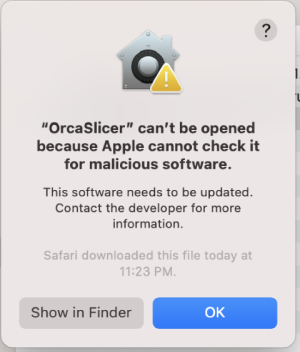
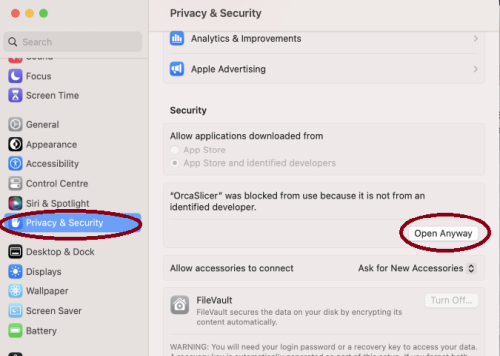
- Step 2: in
System Settings->Privacy & Security, clickOpen Anyway:
- Step 1: open the app, a warning window will pop up
-


Linux (Ubuntu)
- If you run into trouble executing it, try this command in the terminal:
chmod +x /path_to_appimage/OrcaSlicer_Linux.AppImage
How to Compile
All updated build instructions for Windows, macOS, and Linux are now available on the official OrcaSlicer Wiki - How to build page.
Please refer to the wiki to ensure you're following the latest and most accurate steps for your platform.
Klipper Note
If you're running Klipper, it's recommended to add the following configuration to your printer.cfg file.
# Enable object exclusion
[exclude_object]

# Enable arcs support
[gcode_arcs]
resolution: 0.1
Supports
OrcaSlicer is an open-source project and I'm deeply grateful to all my sponsors and backers.
Their generous support enables me to purchase filaments and other essential 3D printing materials for the project.
Thank you! :)
Sponsors:

|

|
Backers:
Ko-fi supporters ☕: Backers list
Support me



Some background
OrcaSlicer was originally forked from Bambu Studio, it was previously known as BambuStudio-SoftFever.
Bambu Studio is forked from PrusaSlicer by Prusa Research, which is from Slic3r by Alessandro Ranellucci and the RepRap community. OrcaSlicer incorporates a lot of features from SuperSlicer by @supermerill OrcaSlicer's logo is designed by community member Justin Levine (@freejstnalxndr).
License
- OrcaSlicer is licensed under the GNU Affero General Public License, version 3. OrcaSlicer is based on Bambu Studio by BambuLab.
- Bambu Studio is licensed under the GNU Affero General Public License, version 3. Bambu Studio is based on PrusaSlicer by PrusaResearch.
- PrusaSlicer is licensed under the GNU Affero General Public License, version 3. PrusaSlicer is owned by Prusa Research. PrusaSlicer is originally based on Slic3r by Alessandro Ranellucci.
- Slic3r is licensed under the GNU Affero General Public License, version 3. Slic3r was created by Alessandro Ranellucci with the help of many other contributors.
- The GNU Affero General Public License, version 3 ensures that if you use any part of this software in any way (even behind a web server), your software must be released under the same license.
- OrcaSlicer includes a pressure advance calibration pattern test adapted from Andrew Ellis' generator, which is licensed under GNU General Public License, version 3. Ellis' generator is itself adapted from a generator developed by Sineos for Marlin, which is licensed under GNU General Public License, version 3.
- The Bambu networking plugin is based on non-free libraries from BambuLab. It is optional to the OrcaSlicer and provides extended functionalities for Bambulab printer users.