 56a452875e
* Add ffmepg dep

* NEW: reimpl wxMediaCtrl from ffmpeg

Jira: none
Change-Id: I46a47118a7649b2a50fcce8911e2888342ef25de
(cherry picked from commit d6c7f08769c8cfdbbf0e80ad280c9b3408a3c27d)
(cherry picked from commit 94d91be60bfe9bbbcdd21f85b46abc3faf126f17)

* FIX: reset bambu lib after restart network plugin

Change-Id: I4a3a4b7420745835ca3fa00c6edebe9d8d98cbf6
Jira: STUDIO-7571
(cherry picked from commit 28d9c6743fae80bfd40e4ee391e30d62cb16d4ab)

* FIX: ffmpeg decoder memory leak

Change-Id: I997572b5730618a969959f9b24c405d80fa9f83c
Jira: STUDIO-7597
(cherry picked from commit 342cea29bd9593fa89cbb33caff58055b46ebeec)

* FIX: install ffmpeg symbolic sos

Change-Id: Ia4a45182cefcf62a7a4b4a5c89c92251609c5a68
Jira: none
(cherry picked from commit b7f8fa1efdbe0ac2cc896ca24f063f5894fe9f90)

* FIX: ffmpeg swscale & frame_size

Change-Id: I9f4cb8c739b726f7e5cdbe0df7ed06b2eb2154d5
Jira: STUDIO-7624
(cherry picked from commit 5a2c75d835fb437667b590a803eef148baa30875)

* FIX: wxMediaCtrl3 idle image & center pos

Change-Id: Ib9652573e31bfd6229f174c0a1388942d9d98822
Jira: STUDIO-7633
(cherry picked from commit d51247c46e26460b151de79c598d81151280e79c)

* FIX: AVVideoDecoder sws_ctx_ == nullptr on zero size

Change-Id: I9698354bb1f341e276ec9780d4ef4fcd9f8a1028
Jira: STUDIO-7706
(cherry picked from commit ff622e25026a8471c39eb308cf5b115c4a9d84aa)

* fix:cannot open shared object file on linux

Change-Id: Ica66500506cfe8932eac3ae0a58fb7ff30d1da9b
jira:none
(cherry picked from commit febd1aeb4d453bc96571fa5e5727e9e10046cb80)
(cherry picked from commit 5ad579f929154779abd84b01438fd235c647dbf5)

* NEW:add ffmepg build Cmake

buildLinuxImage add ffmpeg so file

jira:nojira

Change-Id: I3e1be53aa58a179b8d9ae048ed7538de3ae8d111
(cherry picked from commit 2d70a1bcb6a5ba601525b08a38e7610f018fe106)

* FIX: ffmpeg cmake install error

jira:nojira

Change-Id: I74cc0f7c86b5364e55cad2af2bd9a82306ee6864
(cherry picked from commit 805df79e3bb044dac29ec1c06736751ccf3675f9)

* FIX: decode video to wxImage on Linux

Change-Id: I5e332a1b0622b3dfc70ac5c4c3bfa62b3411ebdc
Jira: none
(cherry picked from commit c787ba921a31f259e8eb23fd59f178e96279caf9)

* FIX: wxMediaCtrl3 enter Stopped state soon

Change-Id: I120e9d4b9f85599a184650d1d95fe2bec42af171
Jira: STUDIO-8280
(cherry picked from commit 7648d96305d510b9e97f22124961de5115cde830)

* FIX: reset decode buffer zero when scale width changed

Change-Id: Iaa2f99111dd5f7228b7b25e1be0a8cbdbfe982a6
Jira: STUDIO-8422
(cherry picked from commit 659ebc7d07a8f6045ba5443141b44277d7257cec)

* slic3r: Fix missing declarations in wxMediaCtrl3.h

src/slic3r/GUI/wxMediaCtrl3.h:80:10: error: ‘condition_variable’ in namespace ‘std’ does not name a type
   80 |     std::condition_variable m_cond;
      |          ^~~~~~~~~~~~~~~~~~
src/slic3r/GUI/wxMediaCtrl3.h:27:1: note: ‘std::condition_variable’ is defined in header ‘<condition_variable>’; did you forget to ‘#include <condition_variable>’?
   26 | #include "Printer/BambuTunnel.h"
  +++ |+#include <condition_variable>
   27 |
src/slic3r/GUI/wxMediaCtrl3.h:81:10: error: ‘thread’ in namespace ‘std’ does not name a type
   81 |     std::thread m_thread;
      |          ^~~~~~
src/slic3r/GUI/wxMediaCtrl3.h:27:1: note: ‘std::thread’ is defined in header ‘<thread>’; did you forget to ‘#include <thread>’?
   26 | #include "Printer/BambuTunnel.h"
  +++ |+#include <thread>
   27 |

In file included from src/slic3r/GUI/MediaPlayCtrl.h:17,
                 from src/slic3r/GUI/MediaPlayCtrl.cpp:1:
src/slic3r/GUI/wxMediaCtrl3.h:77:13: error: field ‘m_frame’ has incomplete type ‘wxImage’
   77 |     wxImage m_frame;
      |             ^~~~~~~

(cherry picked from commit 727a73333bd67acf5ff2b1c51ff284c2bacdb413)

* slic3r: Fix missing includes in AVVideoDecoder

In file included from src/slic3r/GUI/AVVideoDecoder.cpp:1:
src/slic3r/GUI/AVVideoDecoder.hpp:28:20: error: ‘wxImage’ has not been declared
   28 |     bool toWxImage(wxImage &image, wxSize const &size);
      |                    ^~~~~~~
src/slic3r/GUI/AVVideoDecoder.hpp:28:36: error: ‘wxSize’ has not been declared
   28 |     bool toWxImage(wxImage &image, wxSize const &size);
      |                                    ^~~~~~
src/slic3r/GUI/AVVideoDecoder.hpp:38:10: error: ‘vector’ in namespace ‘std’ does not name a template type
   38 |     std::vector<uint8_t> bits_;
      |          ^~~~~~
src/slic3r/GUI/AVVideoDecoder.hpp:9:1: note: ‘std::vector’ is defined in header ‘<vector>’; did you forget to ‘#include <vector>’?
    8 |     #include <libswscale/swscale.h>
  +++ |+#include <vector>
    9 | }

src/slic3r/GUI/AVVideoDecoder.cpp:145:89: error: invalid use of incomplete type ‘class wxBitmap’
  145 |     bitmap = wxBitmap((char const *) bits_.data(), size.GetWidth(), size.GetHeight(), 32);
      |                                                                                         ^

(cherry picked from commit 781ce14e061366da64fdc2d0d592fa35ee57e67e)

* slic3r: Fix missing includes in wxMediaCtrl2

src/slic3r/GUI/wxMediaCtrl2.cpp: In lambda function:
src/slic3r/GUI/wxMediaCtrl2.cpp:170:13: error: ‘wxMessageBox’ was not declared in this scope; did you mean ‘wxInfoMessageBox’?
  170 |             wxMessageBox(_L("Your system is missing H.264 codecs for GStreamer, which are required to play video.  (Try installing the gstreamer1.0-plugins-bad or gstreamer1.0-libav packages, then restart Bambu Studio?)"), _L("Error"), wxOK);
      |             ^~~~~~~~~~~~
      |             wxInfoMessageBox
src/slic3r/GUI/wxMediaCtrl2.cpp: In member function ‘void wxMediaCtrl2::Load(wxURI)’:
src/slic3r/GUI/wxMediaCtrl2.cpp:179:5: error: ‘wxLog’ has not been declared
  179 |     wxLog::EnableLogging(false);
      |     ^~~~~

(cherry picked from commit 73908d38d8b1f7c8dcae92d55711bc08cbfff23c)

* slic3r: Fix missing wxPaintDC declaration

src/slic3r/GUI/wxMediaCtrl3.cpp: In member function ‘void wxMediaCtrl3::paintEvent(wxPaintEvent&)’:
src/slic3r/GUI/wxMediaCtrl3.cpp:121:5: error: ‘wxPaintDC’ was not declared in this scope; did you mean ‘wxPoint’?
  121 |     wxPaintDC dc(this);
      |     ^~~~~~~~~
      |     wxPoint

(cherry picked from commit 9ab5009235d212699f91e01d7f930f92849ed1e3)

* slic3r: Fix missing BOOST_LOG_TRIVIAL declaration

src/slic3r/GUI/wxMediaCtrl3.cpp:181:23: error: ‘info’ was not declared in this scope
  181 |     BOOST_LOG_TRIVIAL(info) << msg.ToUTF8().data();
      |                       ^~~~
src/slic3r/GUI/wxMediaCtrl3.cpp:181:5: error: ‘BOOST_LOG_TRIVIAL’ was not declared in this scope
  181 |     BOOST_LOG_TRIVIAL(info) << msg.ToUTF8().data();
      |     ^~~~~~~~~~~~~~~~~

(cherry picked from commit c5c41e20ca2fc7f3b53a4c769961f73df6992008)

* FIX: wxMediaCtrl3 zero size crash

Change-Id: I16a3f7b3afe142bb957a1740b8e8c9820c92b349
Jira: STUDIO-8522
(cherry picked from commit 8cdaea1162ccbcc0bd03ecd99346f3b9cf52cf64)

* FIX: TabCtrl button margin

Change-Id: If8b05a4ef9efb8b57989ee1de6543631e5a3cf90
Jira: STUDIO-8265
(cherry picked from commit 1c5e65707109ad0582b6442cf8e515344f799c27)

* ENH: wxMediaCtrl3 display video frame at pts

Change-Id: I8847236d2307101e5f2befc6477cd20b3691841c
Jira: none
(cherry picked from commit 05328da4612c11d50f6fd90e872b97f5f8f46b1d)

* Fix: fix memory leak caused by ffmpeg decoding

Change-Id: I162ad4ea8d4601c1ffe17a65f292566c9dea6f0b
jira: no-jira
(cherry picked from commit eb20d03186c86b7398b97e3bae0a3c7a7b81c58c)

* ENH: update some missing codes

jira: no-jira
Change-Id: Icb2da53911430ac144b0fb601637a7ad31e7e8db
(cherry picked from commit 13b4213f8a24c76c16e49daf905fa29c0f646a5a)

* Fix build

* Update idle image

* Attempt to fix Windows CI build

* FIX: GTK video window resize ran in a free function without member access

wxMediaCtrl_OnSize referenced wxMediaCtrl2's private m_gtk_video_window,
which does not compile on Linux/GTK. Move the resizing into
wxMediaCtrl2::DoSetSize where the member is in scope.

* Install required tools for Linux

* Install required tools for macOS

* Add ffmpeg to flatpak

* Fix Linux build

* Try fix appimage build

* Fix Linux AppImage bundling of deps-built shared libraries

The AppImage dependency closure resolves each bundled ELF's DT_NEEDED
entries with plain ldd, which cannot resolve the deps-built FFmpeg stack
(libavcodec/libavutil/libswscale) once it is copied into the bundle:
those libs are not installed in any standard loader path and carry no
RUNPATH of their own, so ldd reports the siblings as missing and the
build aborts. Extend the loader path with the bundle directory plus the
source directories of already-bundled files (mirroring
scripts/check_appimage_libs.sh), and key the dedup set on the bundled
file path instead of the source path so dependencies resolved from the
bundle directory are not copied onto themselves.

Co-Authored-By: Claude <noreply@anthropic.com>

* Attempt to fix Linux unit test

* Fix Linux unit tests loading deps-built FFmpeg libraries

The test executables that link libslic3r_gui (which links PkgConfig::LIBAV)
have a load-time dependency on the deps-built FFmpeg shared libraries. The CI
unit-test runner only receives the tests artifact, so those libraries were
unresolvable there (Ubuntu 24.04 ships libavcodec.so.60, not .61). Copy the
libraries next to each affected test executable and give it an $ORIGIN rpath,
mirroring the Windows branch that copies DLLs next to every test executable.
orcaslicer_copy_sos now places the copies in the per-config output directory
for multi-config generators, like orcaslicer_copy_dlls does.

Co-Authored-By: Claude <noreply@anthropic.com>

* Add design doc for macOS FFmpeg player

Co-Authored-By: Claude <noreply@anthropic.com>

* Add implementation plan for macOS FFmpeg player

Co-Authored-By: Claude <noreply@anthropic.com>

* feat: use FFmpeg media player on macOS with static FFmpeg

* build: build static-only FFmpeg for macOS deps

Co-Authored-By: Claude <noreply@anthropic.com>

* refactor: remove old BambuPlayer-based media player from macOS

Co-Authored-By: Claude <noreply@anthropic.com>

* fix: add static FFmpeg NOTFOUND guard; drop dead wxMediaCtrl2.h include

* build: drop redundant --enable-shared in FFmpeg deps configure

The literal --enable-shared was always overridden by ${_link_cmd}
(--enable-static --disable-shared on Apple, --enable-shared elsewhere)
and FFmpeg configure processes these flags in order, last one wins.
Remove it and the stale comment documenting the workaround.

Co-Authored-By: Claude <noreply@anthropic.com>

* refactor: remove dead wxMediaCtrl2 player

wxMediaCtrl2 was never instantiated on any platform (USE_WX_MEDIA_CTRL_2
is 0 everywhere); wxMediaCtrl3 replaced it. Delete wxMediaCtrl2.cpp/h,
drop them from the Win/Linux source list and the gettext list.txt, and
collapse the preprocessor-dead #if USE_WX_MEDIA_CTRL_2 gate in
MediaPlayCtrl.h.

Co-Authored-By: Claude <noreply@anthropic.com>

* refactor: remove dead GStreamer bambusrc plugin and its build dep

gstbambusrc was the GStreamer source element for the old wxMediaCtrl2
Wayland player, its only consumer (deleted in the previous commit).
The new FFmpeg player handles bambu:/// URIs through the Bambu C API
instead. Drop the plugin and the gstreamer-1.0 / gstreamer-base-1.0
REQUIRED pkg-config dependencies that existed solely for it.

Co-Authored-By: Claude <noreply@anthropic.com>

* build: move FFmpeg media player sources to the common GUI list

wxMediaCtrl3 and AVVideoDecoder are platform-neutral C++ compiled on
all three platforms, so list them once in the common SLIC3R_GUI_SOURCES
instead of duplicating them in the APPLE and non-APPLE branches. The
else() branch is now empty and drops out entirely.

Co-Authored-By: Claude <noreply@anthropic.com>

* deps: disable FFmpeg VideoToolbox/AudioToolbox HW-accel on macOS

The static libavcodec.a/avutil.a compiled the auto-detected
videotoolbox/audiotoolbox objects, which reference VideoToolbox
framework symbols (_VTDecompressionSession*). The app link line
happened to satisfy them transitively, but the orca_stubgen module
link (CI-only) failed with undefined symbols. The player decodes in
software (swscale), so disable both HW-accel paths to keep the
static libs self-contained.

Co-Authored-By: Claude <noreply@anthropic.com>

* Copy the decoded frame instead of aliasing the decoder's buffer

wxImage with static_data set stores the pointer and never copies it, so the
frame handed to wxMediaCtrl3 aliased AVVideoDecoder::bits_. That buffer is
rewritten by the next sws_scale with the mutex released, reallocated by
bits_.resize() when the window grows, and freed outright when the decoder
leaves PlayThread's loop body at end of stream, all while the GUI thread may
be painting from it.

Windows is unaffected either way, since toWxBitmap already copies the bits
into GDI.

---------

Co-authored-by: chunmao.guo <chunmao.guo@bambulab.com>
Co-authored-by: BBL\chuan.he <chuan.he@bambulab.com>
Co-authored-by: MackBambu <yongfang.bian@bambulab.com>
Co-authored-by: Bastien Nocera <hadess@hadess.net>
Co-authored-by: chao.zhang <chao.zhang@bambulab.com>
Co-authored-by: lane.wei <lane.wei@bambulab.com>
Co-authored-by: Claude <noreply@anthropic.com>
Co-authored-by: SoftFever <103989404+SoftFever@users.noreply.github.com>
Co-authored-by: SoftFever <softfeverever@gmail.com>


OrcaSlicer: an open source Next-Gen Slicing Software for Precision 3D Prints.
Optimize your prints with ultra-fast slicing, intelligent support generation, and seamless printer compatibility—engineered for perfection.
Official links and community
Official Website:
Github Repository:

Follow us:


Join our Discord community:

|
⚠️ CAUTION: Several clickbait and malicious websites, such as orca-slicer[.]com and orcaslicer[.]net, are pretending to be the official OrcaSlicer site. These sites may redirect you to dangerous downloads or contain misleading information. Our only official website is www.orcaslicer.com. If you come across any of these in search results, please report them as unsafe or phishing to help keep the community secure with: - Google Safe Browsing - Microsoft Security Intelligence - IPThreat |
Main features
- Advanced Calibration Tools
Comprehensive suite: temperature towers, flow rate, retraction & more for optimal performance. - Precise Wall and Seam Control
Adjust outer wall spacing and apply scarf seams to enhance print accuracy. - Sandwich Mode and Polyholes Support
Use varied infill patterns and accurate hole shapes for improved clarity. - Overhang and Support Optimization
Modify geometry for printable overhangs with precise support placement. - Granular Controls and Customization
Fine-tune print speed, layer height, pressure, and temperature with precision. - Network Printer Support
Seamless integration with Klipper, PrusaLink, and OctoPrint for remote control. - Mouse Ear Brims & Adaptive Bed Mesh
Automatic brims and adaptive mesh calibration ensure consistent adhesion. - User-Friendly Interface
Intuitive drag-and-drop design with pre-made profiles for popular printers. - Open-Source & Community Driven
Regular updates fueled by continuous community contributions. - Wide Printer Compatibility
Supports a broad range of printers: Bambu Lab, Prusa, Creality, Voron, and more. - Additional features can be found in the change notes.
Wiki
The wiki aims to provide a detailed explanation of the slicer settings, including how to maximize their use and how to calibrate and set up your printer.
Download
Stable Release
📥 Download the Latest Stable Release
Visit our GitHub Releases page for the latest stable version of OrcaSlicer, recommended for most users.
Nightly Builds
🌙 Download the Latest Nightly Build
Explore the latest developments in OrcaSlicer with our nightly builds. Feedback on these versions is highly appreciated.
Belt Printer Builds
The nightly release ships two parallel builds: the standard build and a belt-printer build. Both are attached to the same release — tell them apart by the filename suffix:
- Standard — no suffix (e.g.
OrcaSlicer_Windows_Installer_x64_nightly.exe) - Belt —
_beltsuffix (e.g.OrcaSlicer_Windows_Installer_x64_nightly_belt.exe)
The _belt builds add experimental support for belt / conveyor (infinite-Z) printers, where the model is sliced against a tilted belt surface instead of a flat horizontal bed. They include ready-to-use belt printer profiles, the full belt slicing pipeline (mesh rotation and G-code transforms), belt-aware support generation, and a tilted-bed preview.
⚠️ Belt printer support is under active development and is not yet merged into
main— it currently ships only in these parallel_beltbuilds, produced from thebelt-printerbranch. See tracking PR #14394 and the original documentation in #12998.
How to install
Windows
Download the Windows Installer exe for your preferred version from the releases page. Both x64 and arm64 installers are published — pick the one matching your CPU.
-
For convenience there is also a portable build available.
Troubleshooting
- If you have troubles to run the build, you might need to install following runtimes:
- MicrosoftEdgeWebView2RuntimeInstallerX64
- vcredist2019_x64
- Alternative Download Link Hosted by Microsoft
- This file may already be available on your computer if you've installed visual studio. Check the following location:
%VCINSTALLDIR%Redist\MSVC\v142
Microsoft Store
Install from the Microsoft Store when you prefer a Store-signed package (helps on Windows 11 Smart App Control).
Windows Package Manager
winget install --id=SoftFever.OrcaSlicer -e
Mac
-
Download the universal DMG, which runs on both Apple Silicon and Intel Macs.
-
Drag OrcaSlicer.app to Application folder.
-
If you want to run a build from a PR, you also need to follow the instructions below:
Quarantine
-
Option 1 (You only need to do this once. After that the app can be opened normally.):
- Step 1: Hold cmd and right click the app, from the context menu choose Open.
- Step 2: A warning window will pop up, click Open
-
Option 2: Execute this command in terminal:
xattr -dr com.apple.quarantine /Applications/OrcaSlicer.app -
Option 3:
- Step 1: open the app, a warning window will pop up

- Step 2: in
System Settings->Privacy & Security, clickOpen Anyway:
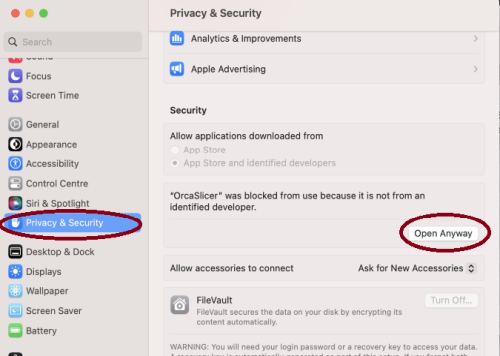
- Step 1: open the app, a warning window will pop up
-


Homebrew Cask
brew install --cask orcaslicer
The Homebrew cask installs the official macOS DMG from GitHub Releases.
Linux
Flathub (Recommended)
OrcaSlicer is available through FlatHub:

Install from the command line:
flatpak install flathub com.orcaslicer.OrcaSlicer
flatpak run com.orcaslicer.OrcaSlicer
It can also be installed through graphical software managers (KDE Discover, GNOME Software, etc.) when Flathub is enabled. Search for OrcaSlicer in your software center.
AppImage
AppImages are published for both x86_64 and aarch64 (ARM64). Pick the file matching your CPU — the ARM64 build has aarch64 in its name (e.g. OrcaSlicer_Linux_AppImage_Ubuntu2404_aarch64_*.AppImage).
-
Download App image from the releases page.
-
Double click the downloaded file to run it.
-
If you run into trouble executing it, try this command in the terminal:
chmod +x /path_to_appimage/OrcaSlicer_Linux.AppImage
How to Compile
All updated build instructions for Windows, macOS, and Linux are now available on the official OrcaSlicer Wiki - How to build page.
Please refer to the wiki to ensure you're following the latest and most accurate steps for your platform.
Klipper Note
If you're running Klipper, it's recommended to add the following configuration to your printer.cfg file.
# Enable object exclusion
[exclude_object]

# Enable arcs support
[gcode_arcs]
resolution: 0.1
Supports
OrcaSlicer is an open-source project, and we're deeply grateful to all our sponsors and backers.
Their generous support helps fund filaments and other essential 3D printing materials for the project.
Thank you! :)
Sponsors

|

|
Backers:
Ko-fi supporters ☕: Backers list
Support the project



Some Background
Open-source slicing has always been built on a tradition of collaboration and attribution. Slic3r, created by Alessandro Ranellucci and the RepRap community, laid the foundation. PrusaSlicer by Prusa Research built on Slic3r and acknowledged that heritage. Bambu Studio in turn forked from PrusaSlicer, and SuperSlicer by @supermerill extended PrusaSlicer with community-driven enhancements. Each project carried the work of its predecessors forward, crediting those who came before.
OrcaSlicer began in that same spirit, drawing from BambuStudio, PrusaSlicer, and ideas inspired by CuraSlicer and SuperSlicer. But it has since grown far beyond its origins. Through relentless innovation — introducing advanced calibration tools, precise wall and seam control, tree supports, adaptive slicing, and hundreds of other features — OrcaSlicer has become the most widely used and actively developed open-source slicer in the 3D printing community. Many of its innovations have been adopted by other slicers, making it a driving force for the entire industry.
The OrcaSlicer logo was designed by community member Justin Levine.
License
- OrcaSlicer is licensed under the GNU Affero General Public License, version 3.
- The GNU Affero General Public License, version 3 ensures that if you use any part of this software in any way (even behind a web server), your software must be released under the same license.
- OrcaSlicer includes a pressure advance calibration pattern test adapted from Andrew Ellis' generator, which is licensed under GNU General Public License, version 3. Ellis' generator is itself adapted from a generator developed by Sineos for Marlin, which is licensed under GNU General Public License, version 3.
- The Bambu networking plugin is based on non-free libraries from BambuLab. It is optional to the OrcaSlicer and provides extended functionalities for Bambulab printer users.