 Kris AustinandRodrigo Faselli
1749c293a6
Kris AustinandRodrigo Faselli
1749c293a6
* build: enable /Zc:lambda for MSVC

MSVC keeps its legacy lambda processor under /std:c++17, which rejects
reading a constexpr constant inside a lambda that does not capture it
(C3493). No other compiler requires that capture, and clang reports it as
an unused one, so the two cannot both be satisfied without the flag.

/Zc:lambda selects the conforming lambda parser that clang and GCC
already use. It is implied by /std:c++20 and /permissive-, so it is only
needed while we are on C++17. clang-cl is conforming already and does not
take the flag.

It requires VS2019 16.8, so build_release_vs.bat now says 16.8+.

* build: clear 237 unused lambda capture warnings

236 captures across 81 files, 142 of them `this`. Removing an unused
capture changes no behavior; clang does not report a capture whose type
has a non-trivial destructor, so nothing held only to extend an object's
lifetime is in this set.

Nine of them are the second half of the warning, "is not required to be
captured for this use", where the capture is a const or constexpr value
the body does read. Those depend on the /Zc:lambda change in the previous
commit. One of them, in FillRectilinear.cpp, had been worked around with
an #ifndef __APPLE__ guard around the capture list, which is now gone.

GUI_ObjectTableSettings.cpp captured its reset button only to read it
inside #ifdef __WXOSX_MAC__. That branch now takes the button from the
event it is already handling.

* build: fail configure on MSVC older than 19.28 instead of dropping /Zc:lambda

cl.exe answers an unrecognized /Zc: sub-option with warning D9002 and keeps
going, so on VS2019 before 16.8 the flag is silently ignored and the build
instead dies with C3493 in FillRectilinear.cpp, nowhere near the cause.

* fix: delete three locals that are now unused

Their only remaining use was the lambda capture this branch removed. The
Clang builds set -Wno-unused-variable, so the build never flagged them.

---------

Co-authored-by: Rodrigo Faselli <162915171+RF47@users.noreply.github.com>


OrcaSlicer: an open source Next-Gen Slicing Software for Precision 3D Prints.
Optimize your prints with ultra-fast slicing, intelligent support generation, and seamless printer compatibility—engineered for perfection.
Official links and community
Official Website:
Github Repository:

Follow us:


Join our Discord community:

|
⚠️ CAUTION: Several clickbait and malicious websites, such as orca-slicer[.]com and orcaslicer[.]net, are pretending to be the official OrcaSlicer site. These sites may redirect you to dangerous downloads or contain misleading information. Our only official website is www.orcaslicer.com. If you come across any of these in search results, please report them as unsafe or phishing to help keep the community secure with: - Google Safe Browsing - Microsoft Security Intelligence - IPThreat |
Main features
- Advanced Calibration Tools
Comprehensive suite: temperature towers, flow rate, retraction & more for optimal performance. - Precise Wall and Seam Control
Adjust outer wall spacing and apply scarf seams to enhance print accuracy. - Sandwich Mode and Polyholes Support
Use varied infill patterns and accurate hole shapes for improved clarity. - Overhang and Support Optimization
Modify geometry for printable overhangs with precise support placement. - Granular Controls and Customization
Fine-tune print speed, layer height, pressure, and temperature with precision. - Network Printer Support
Seamless integration with Klipper, PrusaLink, and OctoPrint for remote control. - Mouse Ear Brims & Adaptive Bed Mesh
Automatic brims and adaptive mesh calibration ensure consistent adhesion. - User-Friendly Interface
Intuitive drag-and-drop design with pre-made profiles for popular printers. - Open-Source & Community Driven
Regular updates fueled by continuous community contributions. - Wide Printer Compatibility
Supports a broad range of printers: Bambu Lab, Prusa, Creality, Voron, and more. - Additional features can be found in the change notes.
Wiki
The wiki aims to provide a detailed explanation of the slicer settings, including how to maximize their use and how to calibrate and set up your printer.
Download
Stable Release
📥 Download the Latest Stable Release
Visit our GitHub Releases page for the latest stable version of OrcaSlicer, recommended for most users.
Nightly Builds
🌙 Download the Latest Nightly Build
Explore the latest developments in OrcaSlicer with our nightly builds. Feedback on these versions is highly appreciated.
Belt Printer Builds
The nightly release ships two parallel builds: the standard build and a belt-printer build. Both are attached to the same release — tell them apart by the filename suffix:
- Standard — no suffix (e.g.
OrcaSlicer_Windows_Installer_x64_nightly.exe) - Belt —
_beltsuffix (e.g.OrcaSlicer_Windows_Installer_x64_nightly_belt.exe)
The _belt builds add experimental support for belt / conveyor (infinite-Z) printers, where the model is sliced against a tilted belt surface instead of a flat horizontal bed. They include ready-to-use belt printer profiles, the full belt slicing pipeline (mesh rotation and G-code transforms), belt-aware support generation, and a tilted-bed preview.
⚠️ Belt printer support is under active development and is not yet merged into
main— it currently ships only in these parallel_beltbuilds, produced from thebelt-printerbranch. See tracking PR #14394 and the original documentation in #12998.
How to install
Windows
Download the Windows Installer exe for your preferred version from the releases page. Both x64 and arm64 installers are published — pick the one matching your CPU.
-
For convenience there is also a portable build available.
Troubleshooting
- If you have troubles to run the build, you might need to install following runtimes:
- MicrosoftEdgeWebView2RuntimeInstallerX64
- vcredist2019_x64
- Alternative Download Link Hosted by Microsoft
- This file may already be available on your computer if you've installed visual studio. Check the following location:
%VCINSTALLDIR%Redist\MSVC\v142
Microsoft Store
Install from the Microsoft Store when you prefer a Store-signed package (helps on Windows 11 Smart App Control).
Windows Package Manager
winget install --id=SoftFever.OrcaSlicer -e
Mac
-
Download the universal DMG, which runs on both Apple Silicon and Intel Macs.
-
Drag OrcaSlicer.app to Application folder.
-
If you want to run a build from a PR, you also need to follow the instructions below:
Quarantine
-
Option 1 (You only need to do this once. After that the app can be opened normally.):
- Step 1: Hold cmd and right click the app, from the context menu choose Open.
- Step 2: A warning window will pop up, click Open
-
Option 2: Execute this command in terminal:
xattr -dr com.apple.quarantine /Applications/OrcaSlicer.app -
Option 3:
- Step 1: open the app, a warning window will pop up
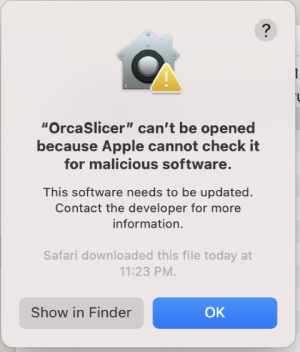
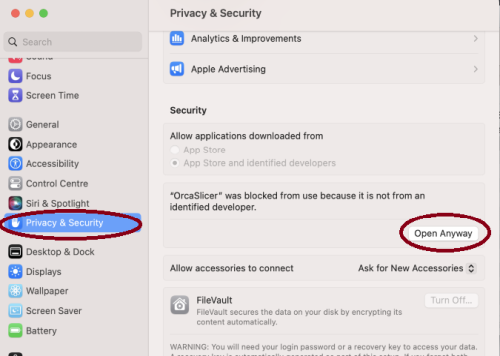
- Step 2: in
System Settings->Privacy & Security, clickOpen Anyway:
- Step 1: open the app, a warning window will pop up
-


Homebrew Cask
brew install --cask orcaslicer
The Homebrew cask installs the official macOS DMG from GitHub Releases.
Linux
Flathub (Recommended)
OrcaSlicer is available through FlatHub:

Install from the command line:
flatpak install flathub com.orcaslicer.OrcaSlicer
flatpak run com.orcaslicer.OrcaSlicer
It can also be installed through graphical software managers (KDE Discover, GNOME Software, etc.) when Flathub is enabled. Search for OrcaSlicer in your software center.
AppImage
AppImages are published for both x86_64 and aarch64 (ARM64). Pick the file matching your CPU — the ARM64 build has aarch64 in its name (e.g. OrcaSlicer_Linux_AppImage_Ubuntu2404_aarch64_*.AppImage).
-
Download App image from the releases page.
-
Double click the downloaded file to run it.
-
If you run into trouble executing it, try this command in the terminal:
chmod +x /path_to_appimage/OrcaSlicer_Linux.AppImage
How to Compile
All updated build instructions for Windows, macOS, and Linux are now available on the official OrcaSlicer Wiki - How to build page.
Please refer to the wiki to ensure you're following the latest and most accurate steps for your platform.
Klipper Note
If you're running Klipper, it's recommended to add the following configuration to your printer.cfg file.
# Enable object exclusion
[exclude_object]

# Enable arcs support
[gcode_arcs]
resolution: 0.1
Supports
OrcaSlicer is an open-source project, and we're deeply grateful to all our sponsors and backers.
Their generous support helps fund filaments and other essential 3D printing materials for the project.
Thank you! :)
Sponsors

|

|
Backers:
Ko-fi supporters ☕: Backers list
Support the project



Some Background
Open-source slicing has always been built on a tradition of collaboration and attribution. Slic3r, created by Alessandro Ranellucci and the RepRap community, laid the foundation. PrusaSlicer by Prusa Research built on Slic3r and acknowledged that heritage. Bambu Studio in turn forked from PrusaSlicer, and SuperSlicer by @supermerill extended PrusaSlicer with community-driven enhancements. Each project carried the work of its predecessors forward, crediting those who came before.
OrcaSlicer began in that same spirit, drawing from BambuStudio, PrusaSlicer, and ideas inspired by CuraSlicer and SuperSlicer. But it has since grown far beyond its origins. Through relentless innovation — introducing advanced calibration tools, precise wall and seam control, tree supports, adaptive slicing, and hundreds of other features — OrcaSlicer has become the most widely used and actively developed open-source slicer in the 3D printing community. Many of its innovations have been adopted by other slicers, making it a driving force for the entire industry.
The OrcaSlicer logo was designed by community member Justin Levine.
License
- OrcaSlicer is licensed under the GNU Affero General Public License, version 3.
- The GNU Affero General Public License, version 3 ensures that if you use any part of this software in any way (even behind a web server), your software must be released under the same license.
- OrcaSlicer includes a pressure advance calibration pattern test adapted from Andrew Ellis' generator, which is licensed under GNU General Public License, version 3. Ellis' generator is itself adapted from a generator developed by Sineos for Marlin, which is licensed under GNU General Public License, version 3.
- The Bambu networking plugin is based on non-free libraries from BambuLab. It is optional to the OrcaSlicer and provides extended functionalities for Bambulab printer users.